Audience: event administrators and client administrators. Applies to: all plans.
Every session has a type, chosen in Type on the session's page. The type decides whether the session has a list of people expected at it, whether the check-in app can scan people into it, and which settings it has. There are three: Bookable, Open to all and Agenda item.
The three types
| Bookable | Open to all | Agenda item | |
|---|---|---|---|
| What it's for | Workshops, breakouts and anything with limited places | Keynotes, the registration desk, anything everyone can attend | Breaks, lunch and networking: on the agenda only |
| List of people expected | Yes: the people booked on it | No | No |
| Scanned with the check-in app | Yes | Yes: any attendee can be scanned in | No, never |
| Capacity | Yes | Yes | No |
| Waitlist and Who can book | Yes | No | No |
| Check-in settings | Yes | Yes | No |
| Opens from the Sessions list | The session overview (View) | The session overview (View) | Its settings (Edit) |
A new session starts as Bookable. Add agenda item on the Sessions list starts one as Agenda item.
Bookable
A Bookable session has an expected list: the people booked on it, by you or in the attendee app. Its session overview shows who is expected, who is still awaited and who has been scanned in. In the check-in app, someone who isn't on the list sees Not In Session. See Let in someone who isn't booked on a session.
Only Bookable sessions have a Waitlist and Who can book, the registration types that may book the session. See Session capacity and waitlists.
Open to all
An Open to all session has no list: anyone with a valid ticket or wristband can be scanned in. Its session overview shows who has been scanned. Use it for sessions everyone may attend, and for registration, with Mark attendee as arrived at the event turned on. See Check attendees in at registration.
Agenda item
An agenda item shows on the attendee app agenda, with its times and room, but is never scanned. It has no attendee list, no capacity and no check-in settings, so its page has no Booking or Check-in section.
Changing a session's type
You can change Type on the session's page, then select Save changes.
- Changing a Bookable session to another type clears its waitlist and Who can book.
- Changing any session to Agenda item also clears its capacity and its check-in settings.
Where you'll see the type
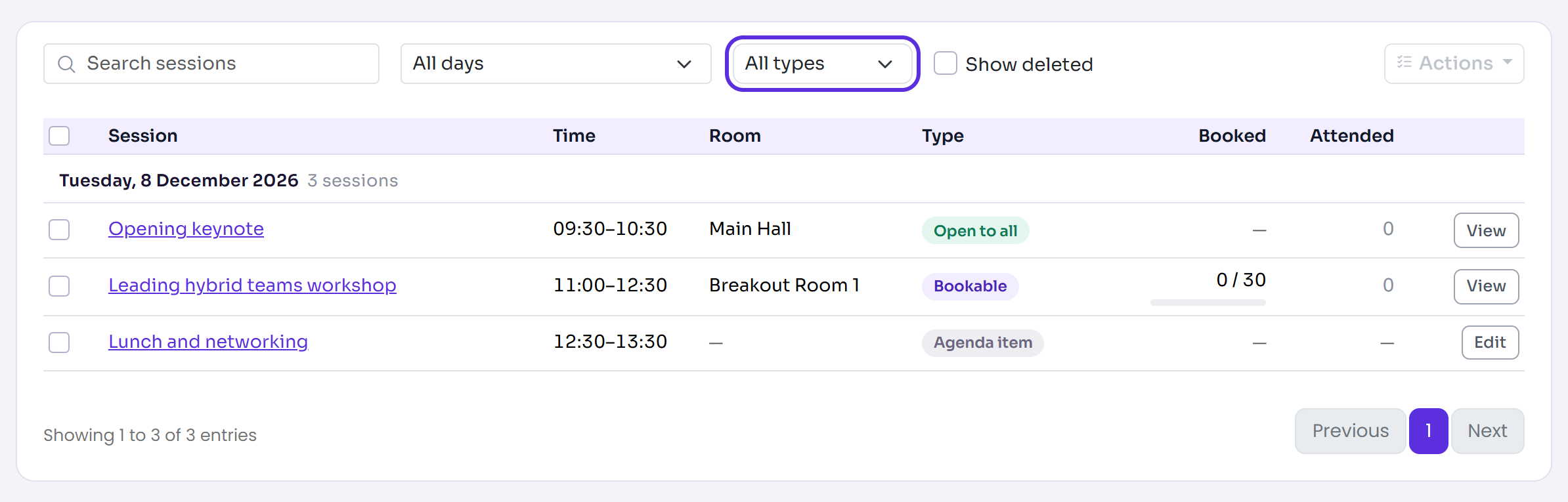
The Sessions list shows each session's type in its Type column, and you can show one type with the All types filter. The list, the filter and the session overview all call an agenda item Agenda item.
Related articles
- Create a session
- Session capacity and waitlists
- Manage session attendance
- Check attendees in at registration
Still stuck? Contact Delekit support.
Was this article helpful?
That’s Great!
Thank you for your feedback
Sorry! We couldn't be helpful
Thank you for your feedback
Feedback sent
We appreciate your effort and will try to fix the article