Audience: event administrators and client administrators. Applies to: all plans. Refunds apply only to tickets paid by card.
Cancel someone's registration from their attendee page. Their tickets are released for others to book, anything they paid by card is refunded minus the ticket's cancellation fee (unless you waive it), and they can be sent the cancellation email. You can do this whatever your cancellation policy says.
Before you start
- You can cancel a registration that's Confirmed or Waitlisted. Change status offers Cancelled for those, and for Registered interest.
- Your cancellation policy limits attendees, not you. The deadline and the guest rule don't apply when you cancel. See Set a cancellation policy and fees.
- Refunds go back to the card they paid with. An order paid by invoice has nothing refunded by Delekit: see Let people pay by invoice.
- Only this person is cancelled. If they booked for a group, their guests stay booked: cancel each guest on their own page.
- Clearing test bookings? Delete them instead: see Test a registration before you go live.
Cancel the registration
In the menu, select Attendees, then View all. Search for the person and select their name.
Select Change status.

In New status, choose Cancelled. If you like, enter a Reason: it's recorded in their status history.
Leave Email them about the change ticked to send the cancellation email from their invite list, or untick it. The pop-up says which email will be sent, or why none can be.
To refund everything they paid, tick Waive the cancellation fee (refund in full).
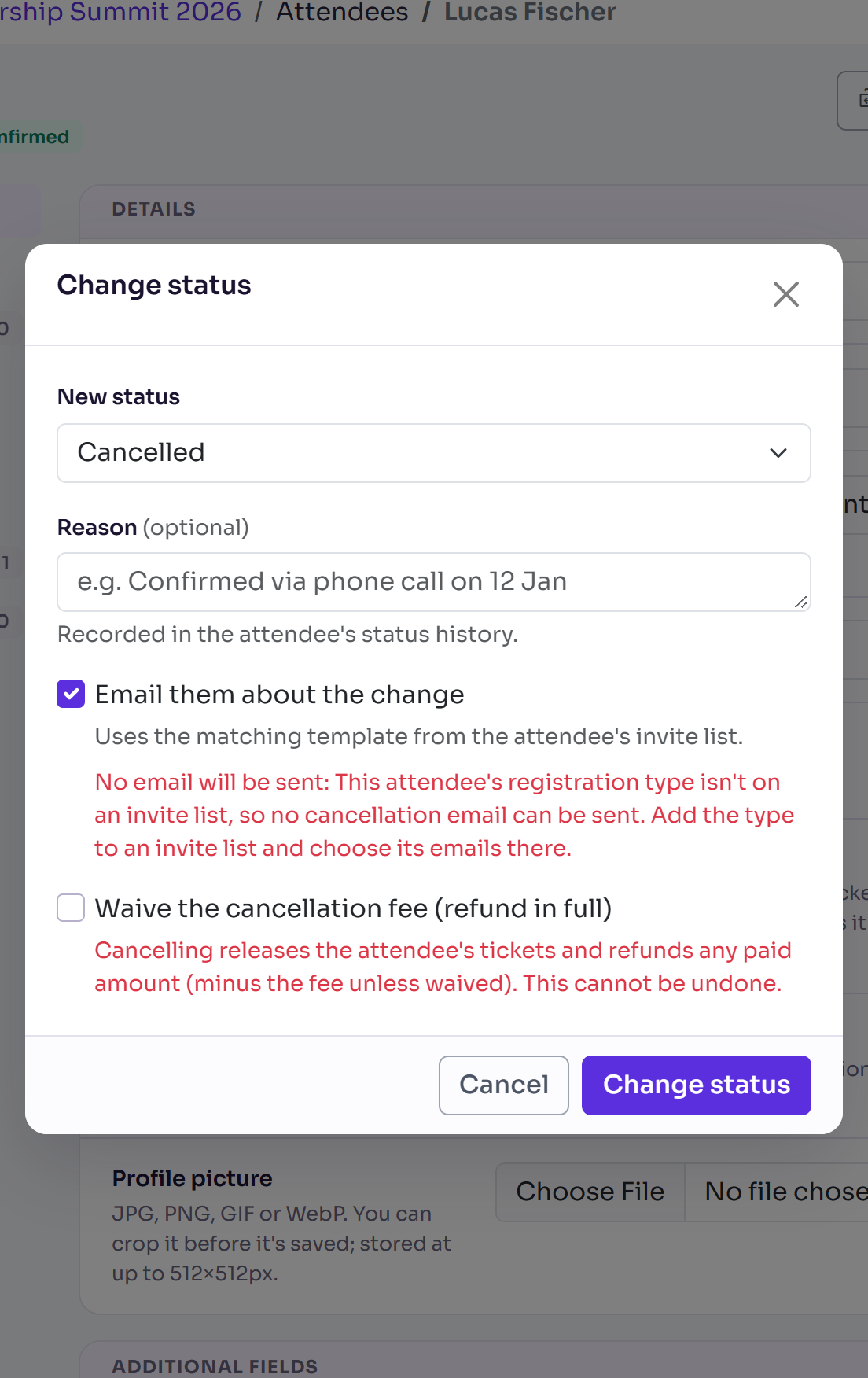
Select Change status. It says "Cancelling tickets and issuing any refund…" while it works.
The page reloads with Registration cancelled and cancellation email sent, or Registration cancelled if you didn't email them.
What happens next
- Their status is Cancelled, with "Cancelled by admin" (or your reason) in their history.
- Their tickets are cancelled, so their places can be booked by someone else.
- What they paid by card is refunded through your payment provider, minus the cancellation fee unless you waived it. Their Orders section shows the amount under Refunded. See View an attendee's orders and payments.
- The refund can't be undone. You can change their status back to Confirmed, which gives them their places again (you're asked first if that goes over capacity), but no payment is taken.
Cancel several people at once
In the Attendees list, tick them, then select Actions and Change status. The same refund and fee rules apply to each. See Change status or type for many attendees at once.
Check it works
Reload the attendee's page: the status shows Cancelled, and Orders shows any refund. If you emailed them, the email is on their page under Emails sent.
If something isn't right
- Cancelled isn't offered: their status can't move to Cancelled, for example Invited or Pending additional information. See Attendee statuses explained.
- "Registration cancelled, but the cancellation email wasn't sent.": the message says why. Usually their invite list has no Cancellation email chosen: see Set up your event's email templates.
- The payment provider refused the refund: you see its reason, and their status isn't changed. Check Orders for anything already refunded before you try again.
- "This registration is not currently active and cannot be cancelled.": it's already cancelled or declined.
Related articles
Still stuck? Contact Delekit support.
Was this article helpful?
That’s Great!
Thank you for your feedback
Sorry! We couldn't be helpful
Thank you for your feedback
Feedback sent
We appreciate your effort and will try to fix the article