Audience: people registering for an event. Applies to: events with paid tickets. Paying by invoice is only offered by some events.
Pay for your tickets on the Payment step of the event's registration page, by card or, where the event offers it, by invoice. Once you've paid, or asked for an invoice, your registration is confirmed.
Before you start
- The Payment step comes after your details and any questions the organiser asks. It shows what you're paying for and the Total.
- Your tickets may be held while you pay. The page shows Your tickets are held for and the time left. If the time runs out, the tickets are released and you go back to the start.
- To change your tickets, select ← Change tickets. Your tickets are released and you choose again.
- Have a discount code? Enter it on the ticket step, before the Payment step. See Register for an event.
Choose how to pay
If the event offers an invoice, the page asks How would you like to pay? Select Pay by card or Pay by invoice. If it doesn't, the card form shows straight away.

Pay by card
- Select Pay by card, if the page asks how you'd like to pay.
- Enter your card details in the card form.
- Select Pay now, or the pay button in the card form. Your bank may ask you to confirm the payment.
You go to your confirmation page. If it says Confirming your payment, wait a few seconds and don't close the page.
Pay by invoice
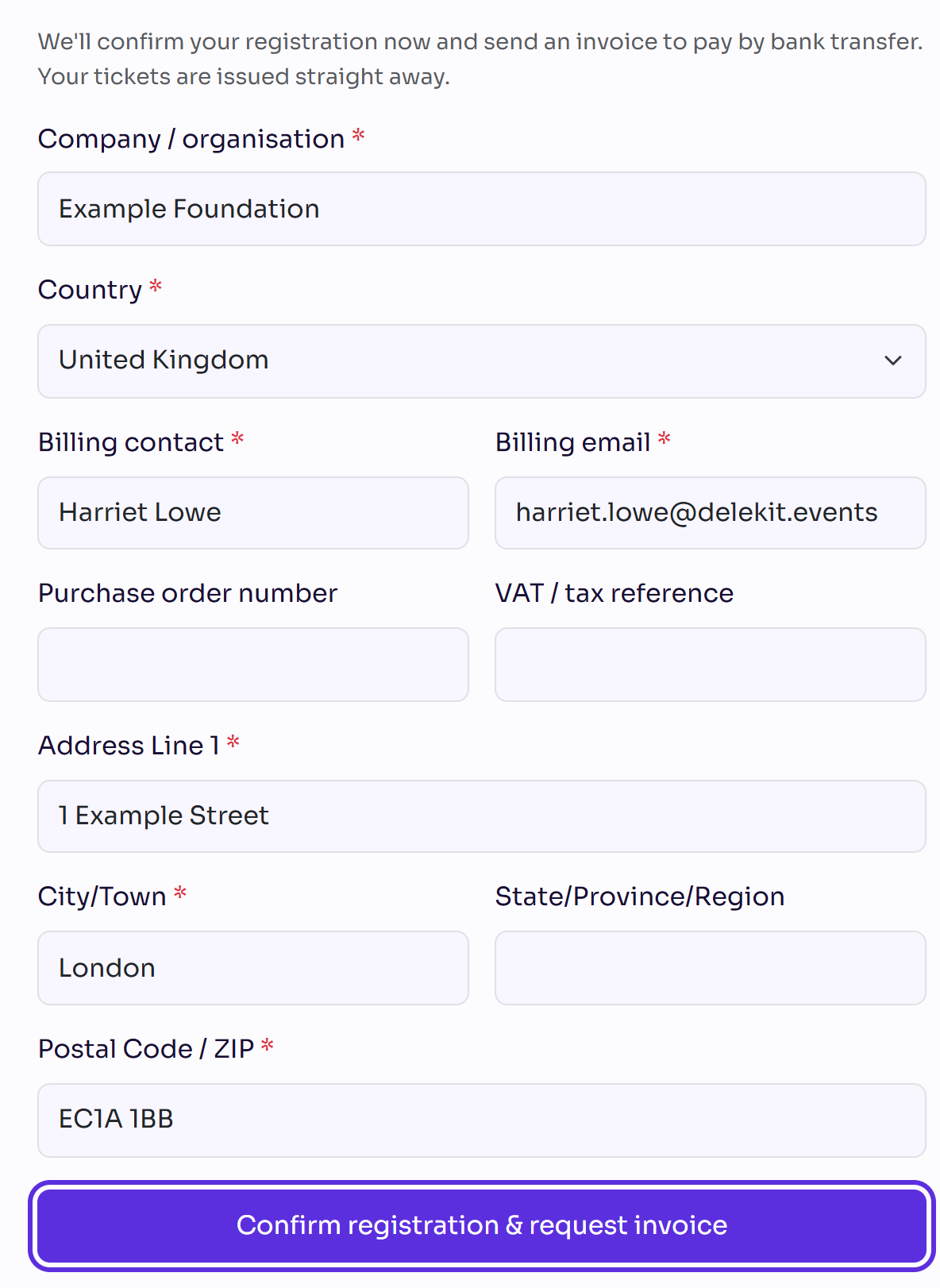
Select Pay by invoice. The page says "We'll confirm your registration now and send an invoice to pay by bank transfer. Your tickets are issued straight away."
Enter the Company / organisation and choose the Country.
Enter the Billing contact and check the Billing email, which starts as your email.
Enter a Purchase order number or VAT / tax reference, if you have one. Both are optional.
Enter the billing address: Address Line 1, City/Town, State/Province/Region (or State for the United States) and Postal Code / ZIP.
Select Confirm registration & request invoice.
What happens next
- By card: your registration is confirmed once the payment goes through.
- By invoice: your registration is confirmed straight away. Pay the invoice by bank transfer. Until the organiser has your payment, your receipt says Awaiting payment.
- If you booked for other people, you add their details next. See Complete your guests' details.
- Your receipt: if the organiser's email has a link to your receipt, it opens a Receipt page with Download PDF.
If something isn't right
- "Your payment didn't go through, so your booking isn't complete yet." Try again, or choose another way to pay.
- "Payment not completed" on your confirmation page: select Try payment again. If the page says your tickets have been released, select Start again.
- "Please complete the highlighted fields before continuing." Fill in the fields the invoice form marks.
- "Please choose the state for a United States billing address." Choose the State.
- The time ran out. Your tickets were released. Start again on the event's registration page.
- You paid but see no confirmation email: see I haven't received my confirmation email.
Related articles
Still stuck? Contact Delekit support.
Was this article helpful?
That’s Great!
Thank you for your feedback
Sorry! We couldn't be helpful
Thank you for your feedback
Feedback sent
We appreciate your effort and will try to fix the article